Problem:
When you try to resolve a case in Dynamics CRM 2011, which has open activities of Task, E-mail, Phone Call, Letter, Fax, Appointment and Service Activity you will get following error message “There are still open activities associated with this case, these must be closed before the case can be closed.”

If you are trying to cancel a case which has open activities, you will get following error message.
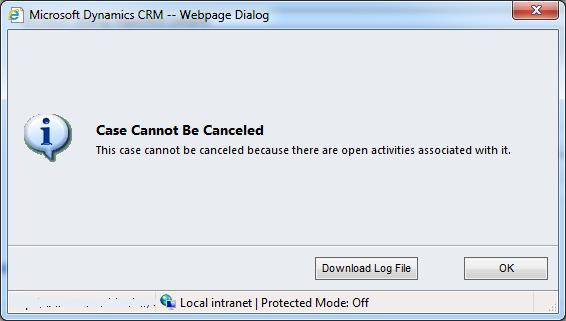
If you are trying to resolve a case thru CRM SDK code, you will get following error message “The incident can not be cancelled because there are open activities for this incident.”

Solution 1:
If you are resolving a Case from CRM UI, you need to manually open each associated activity of the case and do ‘Mark Complete’ or ‘Cancel’
Solution 2:
If you are resolving a case from CRM SDK, you need to use following code to cancel all associated activities of the case.
  // Cancel all associated Case activities which are Open and Scheduled
        public static void CancelCaseActivities(IOrganizationService orgService, Guid caseId)
        {
            string fetchXML = string.Format(@"<fetch version='1.0' output-format='xml-platform' mapping='logical' no-lock='true' distinct='false'>
                                                    <entity name='activitypointer'>
                                                        <attribute name='activityid' />
                                                        <attribute name='activitytypecode' />
                                                        <filter type='and'>
                                                            <condition attribute='regardingobjectid' operator='eq' value='{0}' />
                                                            <condition attribute='statecode' operator='in'>
                                                                <value>0</value>
                                                                <value>3</value>
                                                            </condition>
                                                        </filter>
                                                    </entity>
                                              </fetch>", caseId.ToString());

            var fetchExp = new FetchExpression(fetchXML);

            var activities = orgService.RetrieveMultiple(fetchExp);

            foreach (Entity activity in activities.Entities)
            {
                CancelActivity(activity, orgService);
            }
        }

        // Cancel an Activity
        private static void CancelActivity(Entity entity, IOrganizationService service)
        {
            EntityReference moniker = new EntityReference();
            if (entity.LogicalName == "activitypointer")
            {
                if (entity.Attributes.Contains("activityid") & entity.Attributes.Contains("activitytypecode"))
                {
                    moniker.LogicalName = entity.Attributes["activitytypecode"].ToString();
                    moniker.Id = (Guid)entity.Attributes["activityid"];
                    SetStateRequest request = new SetStateRequest();
                    request.EntityMoniker = moniker;
                    request.State = new OptionSetValue(2);
                    request.Status = new OptionSetValue(-1);
                    SetStateResponse response = (SetStateResponse)service.Execute(request);
                }
            }
        }
/fit-in/580x348/filters:format(webp)/english-betterindia/media/media_files/2026/08/04/8-2026-08-04-18-31-45.png)

/pic9729642.png)